Activating the MultiGP Toolkit#
In order to activate most of the MultiGP Toolkit’s functionality, your MultiGP chapter’s timer API key must be provided.
Adding your MultiGP Chapter’s API Key#
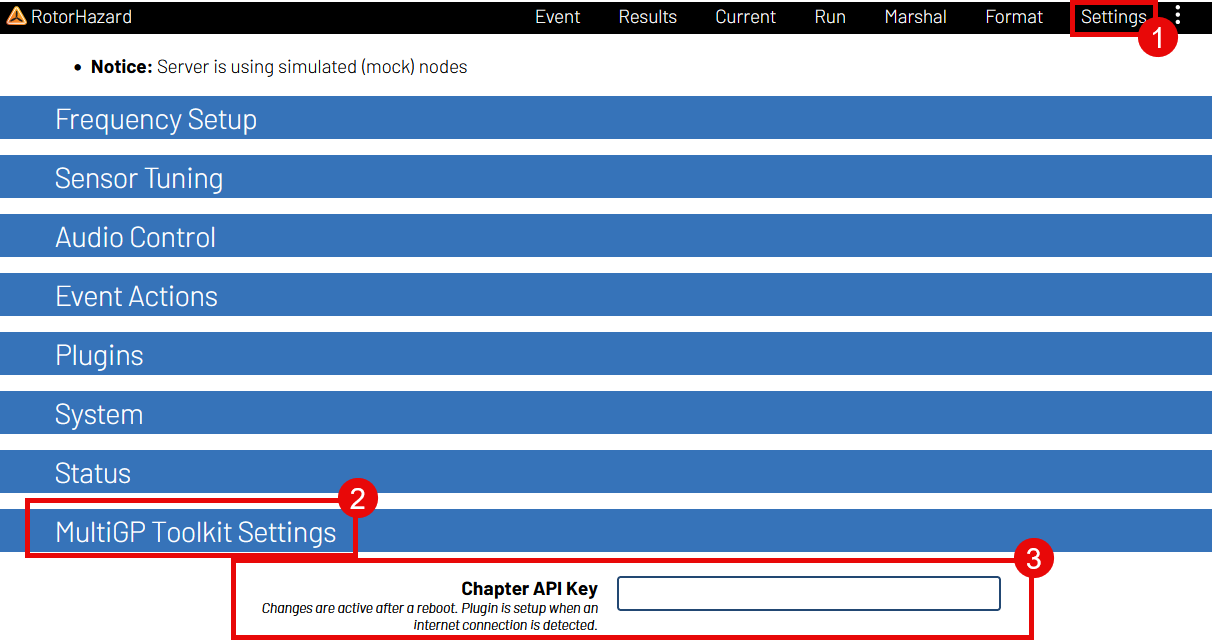
Navigate to the
Settingspage within RotorHazardOpen the
MultiGP CredentialspanelEnter your timer’s API key
Note
After inputting your API key, make sure to click somewhere outside of the entry’s text box. RotorHazard’s internal database will not register the entry otherwise
Reboot the RotorHazard server.
Waiting for Plugin Activation#
After inputting a MultiGP API key, anytime the timer is rebooted, the plugin will attempt to connect to MultiGP to verify the key. To compensate for the time it may take for timer to connect to the network, the plugin will make a multiple attempts to establish a connection over a period of time. It will continue to attempt until it is either successful or the max number of attempts has been reached.
In the event that the timer has successfully connected and the MultiGP API key has been verified, the plugin’s user interface will activate.